Would you like to sign out?

Select Country

  • Afghanistan English
  • Albania English
  • Algeria English
  • American Samoa English
  • Andorra English
  • Angola English
  • Anguilla English
  • Antarctica English
  • Antigua and Barbuda English
  • Argentina Español
  • Armenia English
  • Aruba English
  • Australia English
  • Austria English
  • Azerbaijan English
  • Bahamas English
  • Bahrain English
  • Bangladesh English
  • Barbados English
  • Belarus English
  • Belgium English
  • Belize English
  • Benin English
  • Bermuda English
  • Bhutan English
  • Bolivia Español
  • Bosnia and Herzegovina English
  • Botswana English
  • Bouvet Island English
  • Brazil English
  • British Indian Ocean Territory English
  • British Virgin Islands English
  • Brunei English
  • Bulgaria English
  • Burkina Faso English
  • Burundi English
  • Cambodia English
  • Cameroon English
  • Canada English
  • Cape Verde English
  • Caribbean Netherlands English
  • Cayman Islands English
  • Central African Republic English
  • Chad English
  • Chile Español
  • Christmas Island English
  • Cocos (Keeling) Islands English
  • Colombia Español
  • Comoros English
  • Congo English
  • Cook Islands English
  • Costa Rica Español
  • Côte d’Ivoire English
  • Croatia English
  • Cuba Español
  • Curaçao English
  • Cyprus English
  • Czech Republic English
  • Democratic Republic of the Congo English
  • Denmark English
  • Djibouti English
  • Dominica English
  • Dominican Republic Español
  • Ecuador Español
  • Egypt English
  • El Salvador Español
  • Equatorial Guinea English
  • Eritrea English
  • Estonia English
  • Ethiopia English
  • Falkland Islands English
  • Faroe Islands English
  • Fiji English
  • Finland English
  • France English
  • French Guiana Español
  • French Polynesia English
  • French Southern Territories English
  • Gabon English
  • Gambia English
  • Georgia English
  • Germany English
  • Ghana English
  • Gibraltar English
  • Greece English
  • Greenland English
  • Grenada English
  • Guadeloupe Español
  • Guam English
  • Guatemala Español
  • Guernsey English
  • Guinea English
  • Guinea-Bissau English
  • Guyana English
  • Haiti Español
  • Heard Island and McDonald Islands English
  • Honduras Español
  • Hong Kong English
  • Hungary English
  • Iceland English
  • India English
  • Indonesia English
  • Iran English
  • Iraq English
  • Ireland English
  • Isle of Man English
  • Israel English
  • Italy English
  • Jamaica English
  • Japan 日本語
  • Jersey English
  • Jordan English
  • Kazakhstan English
  • Kenya English
  • Kiribati English
  • South Korea 한국어
  • Kuwait English
  • Kyrgyzstan English
  • Laos English
  • Latvia English
  • Lebanon English
  • Lesotho English
  • Liberia English
  • Libya English
  • Liechtenstein English
  • Lithuania English
  • Luxembourg English
  • Macau English
  • Madagascar English
  • Malawi English
  • Malaysia English
  • Maldives English
  • Mali English
  • Malta English
  • Marshall Islands English
  • Martinique English
  • Mauritania English
  • Mauritius English
  • Mayotte English
  • Mexico Español
  • Micronesia English
  • Moldova English
  • Monaco English
  • Mongolia English
  • Montenegro English
  • Montserrat English
  • Morocco English
  • Mozambique English
  • Myanmar English
  • Namibia English
  • Nauru English
  • Nepal English
  • Netherlands English
  • New Caledonia English
  • New Zealand English
  • Nicaragua Español
  • Niger English
  • Nigeria English
  • Niue English
  • Norfolk Island English
  • Northern Mariana Islands English
  • Norway English
  • Oman English
  • Pakistan English
  • Palau English
  • Palestine English
  • Panama Español
  • Papua New Guinea English
  • Paraguay Español
  • Peru Español
  • Philippines English
  • Pitcairn Islands English
  • Poland English
  • Portugal Español
  • Puerto Rico Español
  • Qatar English
  • Réunion English
  • Romania English
  • Russia English
  • Rwanda English
  • Saint Barthélemy Español
  • Saint Helena English
  • Saint Kitts and Nevis English
  • Saint Lucia English
  • Saint Martin Español
  • Saint Pierre and Miquelon English
  • Saint Vincent and the Grenadines English
  • Samoa English
  • San Marino English
  • São Tomé and Príncipe English
  • Saudi Arabia English
  • Senegal English
  • Serbia English
  • Seychelles English
  • Sierra Leone English
  • Singapore English
  • Sint Maarten English
  • Slovakia English
  • Slovenia English
  • Solomon Islands English
  • Somalia English
  • South Africa English
  • South Georgia English
  • South Sudan English
  • Spain English
  • Sri Lanka English
  • Sudan English
  • Suriname English
  • Svalbard and Jan Mayen English
  • Eswatini English
  • Sweden English
  • Switzerland English
  • Syria English
  • Taiwan English
  • Tajikistan English
  • Tanzania English
  • Thailand English
  • Togo English
  • Tokelau English
  • Tonga English
  • Trinidad and Tobago English
  • Tunisia English
  • Turkey English
  • Turkmenistan English
  • Turks and Caicos Islands English
  • Tuvalu English
  • U.S. Virgin Islands English
  • Uganda English
  • Ukraine English
  • United Arab Emirates English
  • United Kingdom English
  • United States English
  • U.S. Minor Outlying Islands English
  • Uruguay Español
  • Uzbekistan English
  • Vanuatu English
  • Vatican City English
  • Venezuela Español
  • Vietnam English
  • Wallis and Futuna English
  • Western Sahara English
  • Yemen English
  • Zambia English
  • Zimbabwe English
  • Åland Islands English
  • East Timor English
  • Netherlands Antilles English
  • Serbia and Montenegro English
  • North Macedonia English
  • Timor-Leste English
Here you can edit the background of the section

MIDAS CIVIL NX

Main Features

Discover the main features of MIDAS CIVIL NX.
Explore the content and product demonstration videos.

User-friendly Workspace

Intuitive Modeling Environment
SEE MORE
Easy Modeling with Various Wizards
SEE MORE
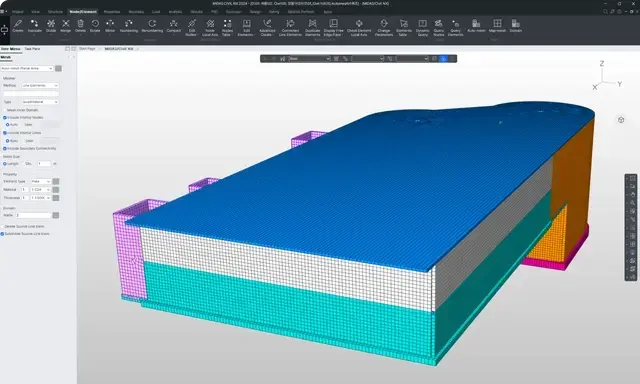
Auto-mesh Feature for Modeling Complex Structures

Auto-mesh Feature for Modeling Complex Structures

Unlike bridges, general civil engineering structures often have complex shapes. Creating finite element models for these complex shapes can be time-consuming as it involves considering element connectivity. However, when the Auto-mesh feature is applied, it automatically generates the element mesh, taking into account connectivity with adjacent elements. This significantly reduces the time required for finite element modeling tasks. Additionally, the Auto-mesh feature provides both triangular and quadrilateral elements, assisting designers in creating high-quality element meshes as needed.

Powerful Simulation/Design

Auto-mesh Feature for Modeling Complex Structures

Auto-mesh Feature for Modeling Complex Structures

Unlike bridges, general civil engineering structures often have complex shapes. Creating finite element models for these complex shapes can be time-consuming as it involves considering element connectivity. However, when the Auto-mesh feature is applied, it automatically generates the element mesh, considering connectivity with adjacent elements. This significantly reduces the time required for finite element modeling tasks. Additionally, the Auto-mesh feature provides both triangular and quadrilateral elements, assisting designers in creating high-quality element meshes as needed.

Automatic Consideration of Moving Loads According to Design Standards
Various Specialized Analysis Functions for Civil Structures

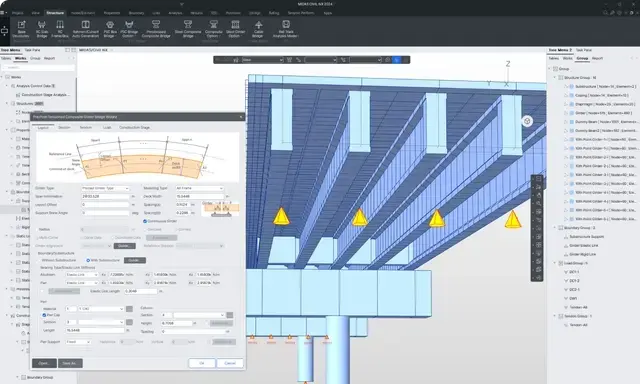
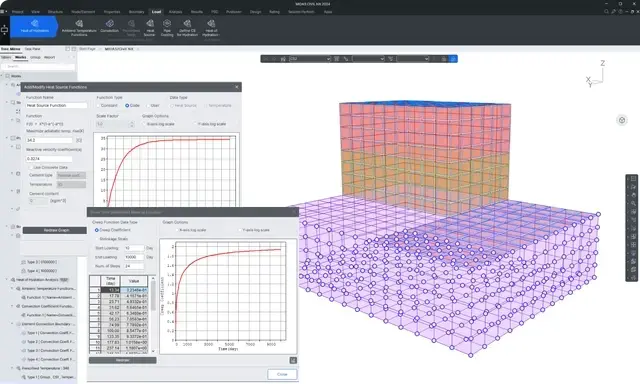
Various Specialized Analysis Functions for Civil Structures

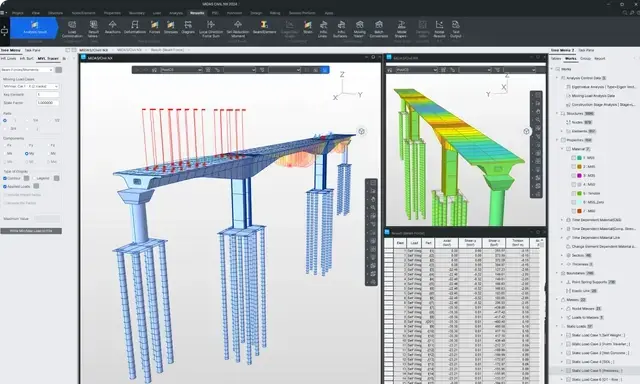
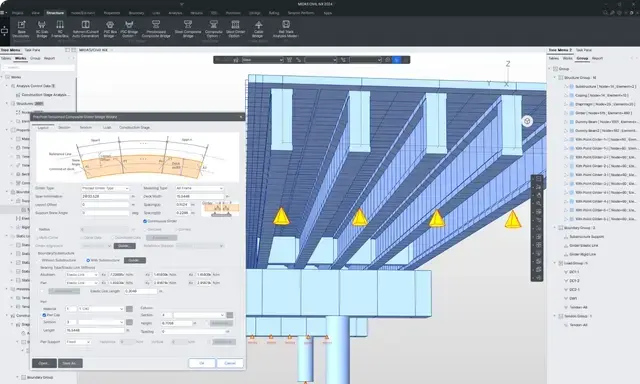
MIDAS CIVIL NX provides specialized analysis functions for bridges. In particular, it offers an environment where all safety checks for analysis by construction phase can be performed. It also allows you to perform a variety of structural analysis and design tasks tailored to the needs of designers, such as thermal deformation analysis, large deformation analysis, and nonlinear material analysis, all in one program. Each analysis function can be carried out through GUI, allowing you to intuitively configure analysis conditions and perform analysis, significantly reducing working time.

SEE MORE
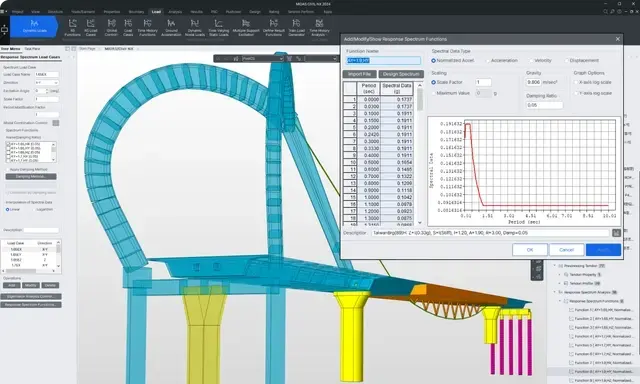
Seismic Analysis and Design

Seismic Analysis and Design

Through the seismic performance evaluation, we calculate bridges' capacity and demand performance, providing a detailed seismic performance assessment report that incorporates nonlinear section analysis and seismic analysis results. Precise analysis of bridge structures considering the nonlinearity of foundation separation devices is possible through dynamic boundary nonlinear analysis. The pushover analysis function allows for the evaluation of the resistance capacity of the structure after yielding, comparing it with the required seismic response. It considers the nonlinear characteristics of materials in components, predicts the inelastic behavior of components, and performs inelastic time history analysis to understand the seismic response characteristics of the structure.

SEE MORE
Reflecting the Latest Domestic and International Design Standards

Reflecting the Latest Domestic and International Design Standards

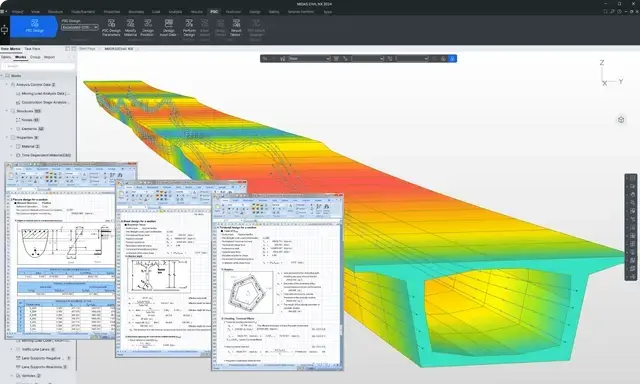
MIDAS CIVIL NX provides design features that allow for quick and accurate review of analysis results and design variables. It offers various international design codes, including AASHTO LRFD, Eurocode, UK, Russia, Canada, Japan, India, Taiwan, and Australia, reflecting worldwide trends in reliability-based design. The design functions are categorized into Steel, RC, PSC, Composite, and SRC Design.
Design Function Automatically Linked to Analysis Results

Design Function Automatically Linked to Analysis Results

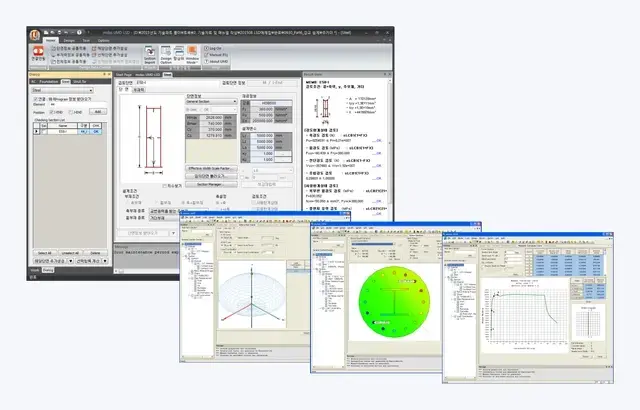
MIDAS GSD considers nonlinear material properties and, through integration with MIDAS CIVIL NX, allows for the definition of arbitrary section shapes and reinforcement, importing member forces by load combination, providing moment-curvature curves, three-dimensional P-M interaction diagrams, and stress distribution considering cracks as an Excel report. It defines nonlinear concrete and reinforcement materials and calculates moment-curvature curves for use as hinge properties in MIDAS CIVIL NX's nonlinear analysis.

Design Automation

Visual Structural Design through Rhino & Grasshopper
Smart Design Beyond BIM Transforming to Analysis Model
Innovative Use of Existing Excel Calculation Sheets

Innovative Use of Existing Excel Calculation Sheets

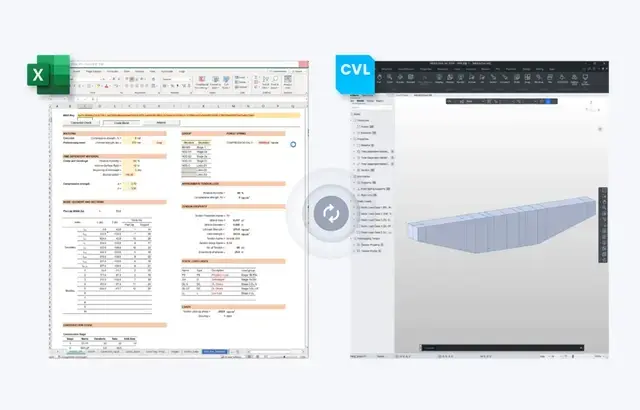
Excel calculation sheets are the most powerful tools for civil engineers. Connecting the existing calculation sheets with MIDAS CIVIL NX, without requiring specific templates, facilitates bidirectional data transfer for automated design and result analysis.

  • Pre-processing Data Export
    • Model Data
    • Material Properties
    • Section Properties
    • Load Data
    • Boundary Conditions
  • Post-processing Data Import
    • Analysis Results
    • Result Image Data (SFD, BMD, etc.)
    • Result Table Data (SFD, BMD, etc.)
    • Model Updates
Excel Add-in Coding-free, template-like utility

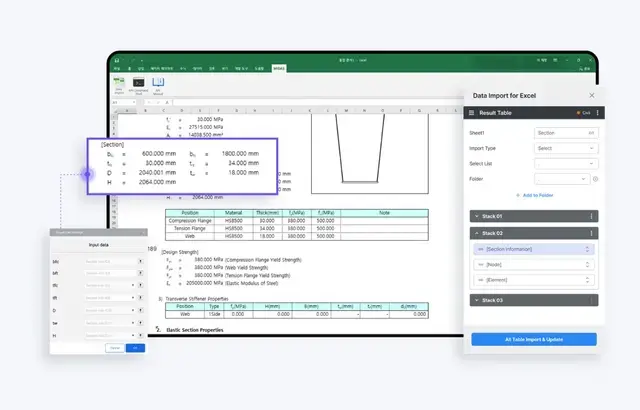
Excel Add-in: Coding-free, template-like utility

MIDAS COLLECTION's connectivity is not confined to specific Excel calculation sheets. Link Add-ins to your familiar sheets to effortlessly connect with MIDAS CIVIL NX.

    • Utilize Templates without Coding: Easily employ templates with simple mouse clicks and operations without the need for coding.
    • Automate Loops: Utilize Add-in stacks and flows to automate repetitive tasks.
    • User Optimization: Execute tasks using JSON-based API Commands.
    • Support for JSON Manuals
MIDAS Plugin

MIDAS Plugin

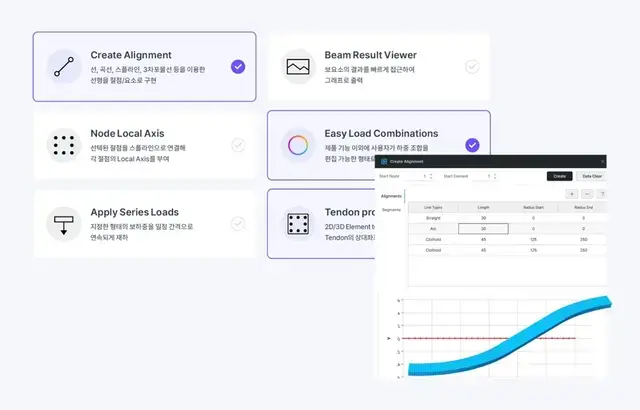
Mix and match the plugins provided by MIDAS to create efficient workflows. The flexibility in selecting plugins allows for swift and effective task completion.

    • Create Alignment: Implement linear elements using lines, curves, splines, 3D curves as points/elements.
    • Easy Load Combinations: Users can edit load combinations beyond product functionalities.
    • Tendon Profile Converter: Converts 2D/3D element tendons to straight and automatically changes the relative local coordinates of the tendon to global coordinates.
Marketplace, an Open Custom Place for Everyone

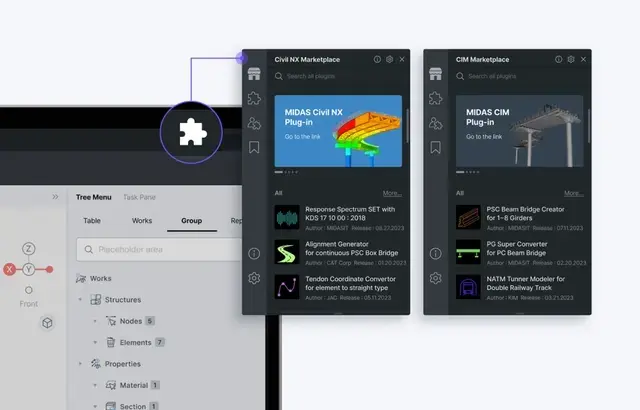
Marketplace, an Open Custom Place for Everyone

MIDAS CIVIL NX plugs provide an essential interface for managing and accessing necessary functionalities. Within a highly scalable environment, users can develop their own plugins, tailoring them to individual and corporate needs.